How can we help?
Frequently Asked Questions about MetaTrader 5 (MT5)
17/03/2026 09:16:01
MetaTrader 5 (MT5) is a professional financial trading terminal that supports multi-asset trading including Forex, Futures, Stocks and more. To ensure smooth trading operations, here are the frequently asked questions and operational guidelines for daily MT5 use, covering core operations such as login, password management, language settings and others.
1. How to Log in to MT5?
Desktop Login
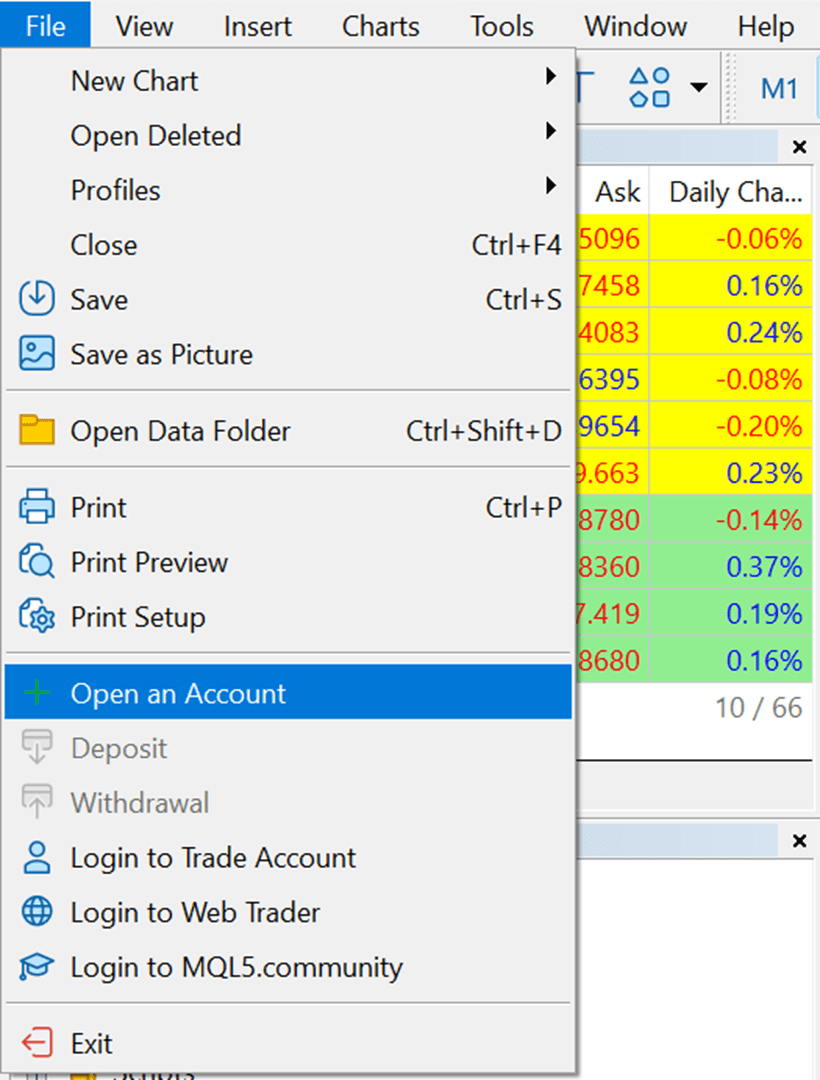
- Open the MT5 desktop client, click the top menu bar [File], and select [Open an Account];
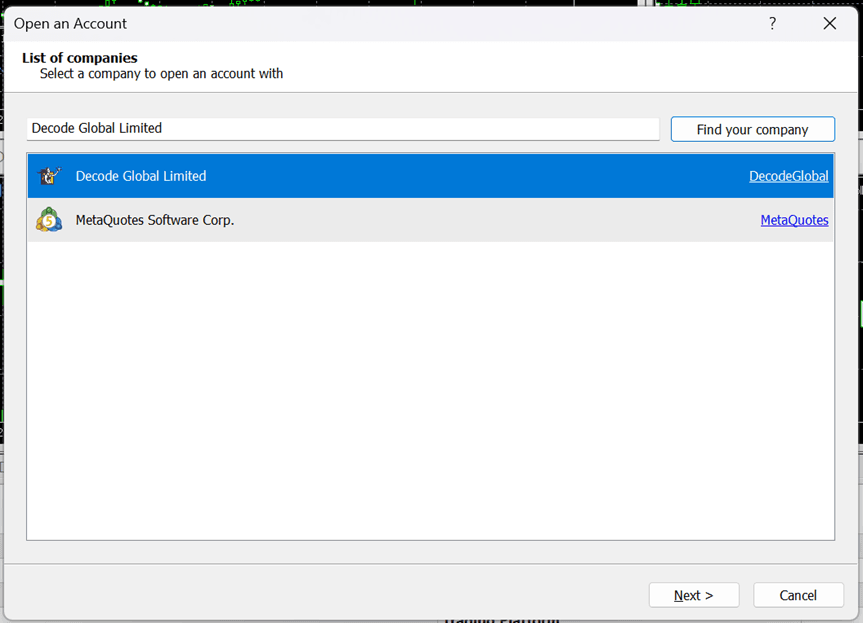
Enter [Decode Global Limited] in the server search box, find the corresponding server and click [Next];
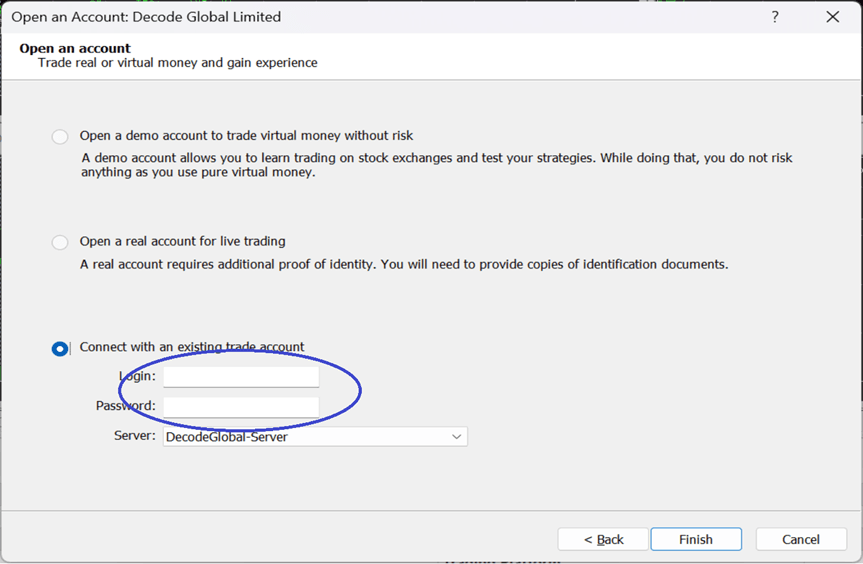
- Tick [Connect with an existing trade account], enter your MT5 login ID and trading password, then click [Finish] to complete the login.
Mobile Login
- Open the MT5 mobile app, click the three horizontal lines in the upper left corner, tap [Start], then click the [+] icon in the upper right corner;
- Search for and select the server [Decode Global Limited];
- Enter your MT5 login ID and trading password in sequence, click [Login], and you can access the trading interface after successful verification.
2. What Are My MT5 Login ID and Password?
2.1 Your MT5 login ID can be viewed in the [Account] → [Forex Account] section on the Bifu web platform, and the password is the same as your initial trading password on the Bifu platform.
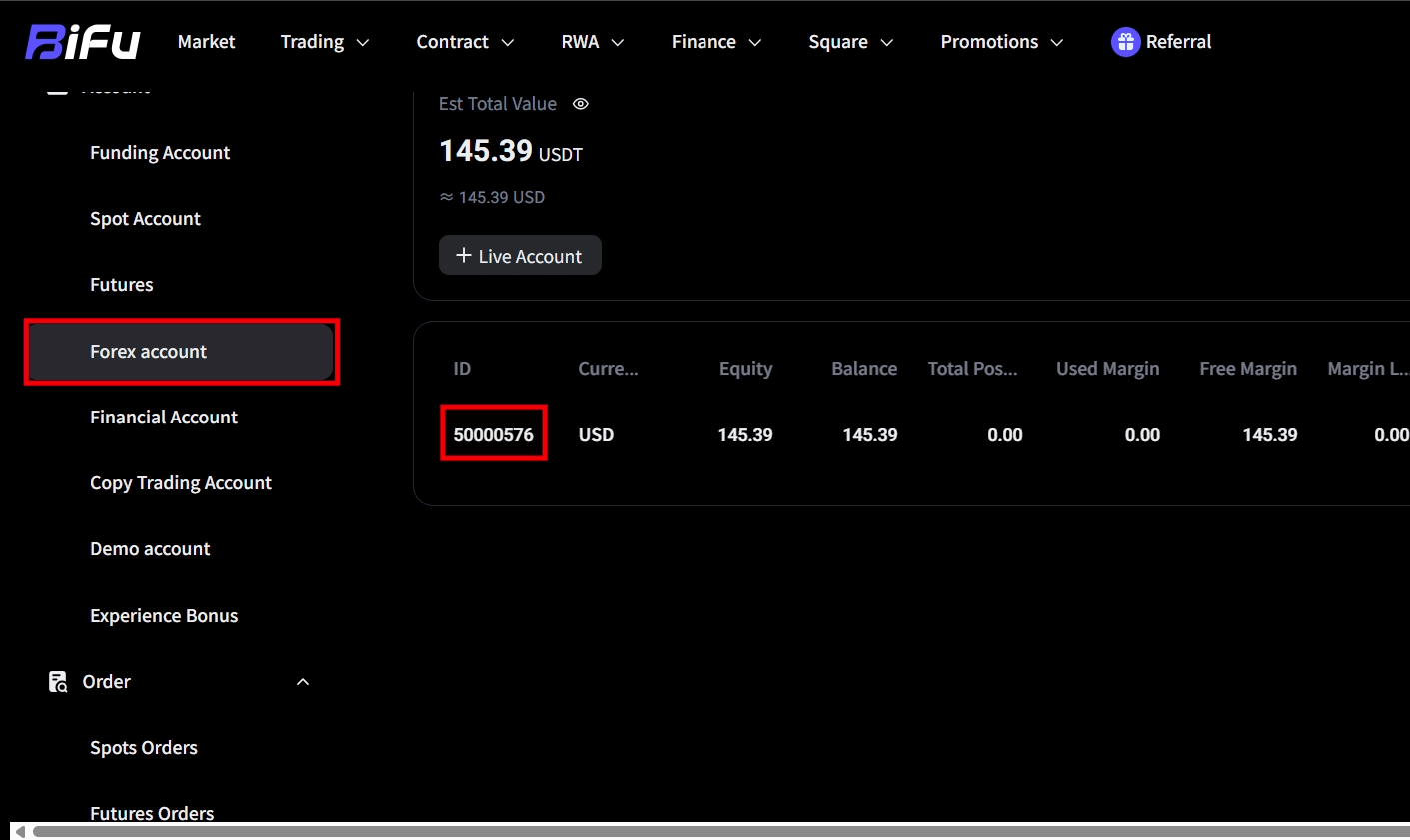
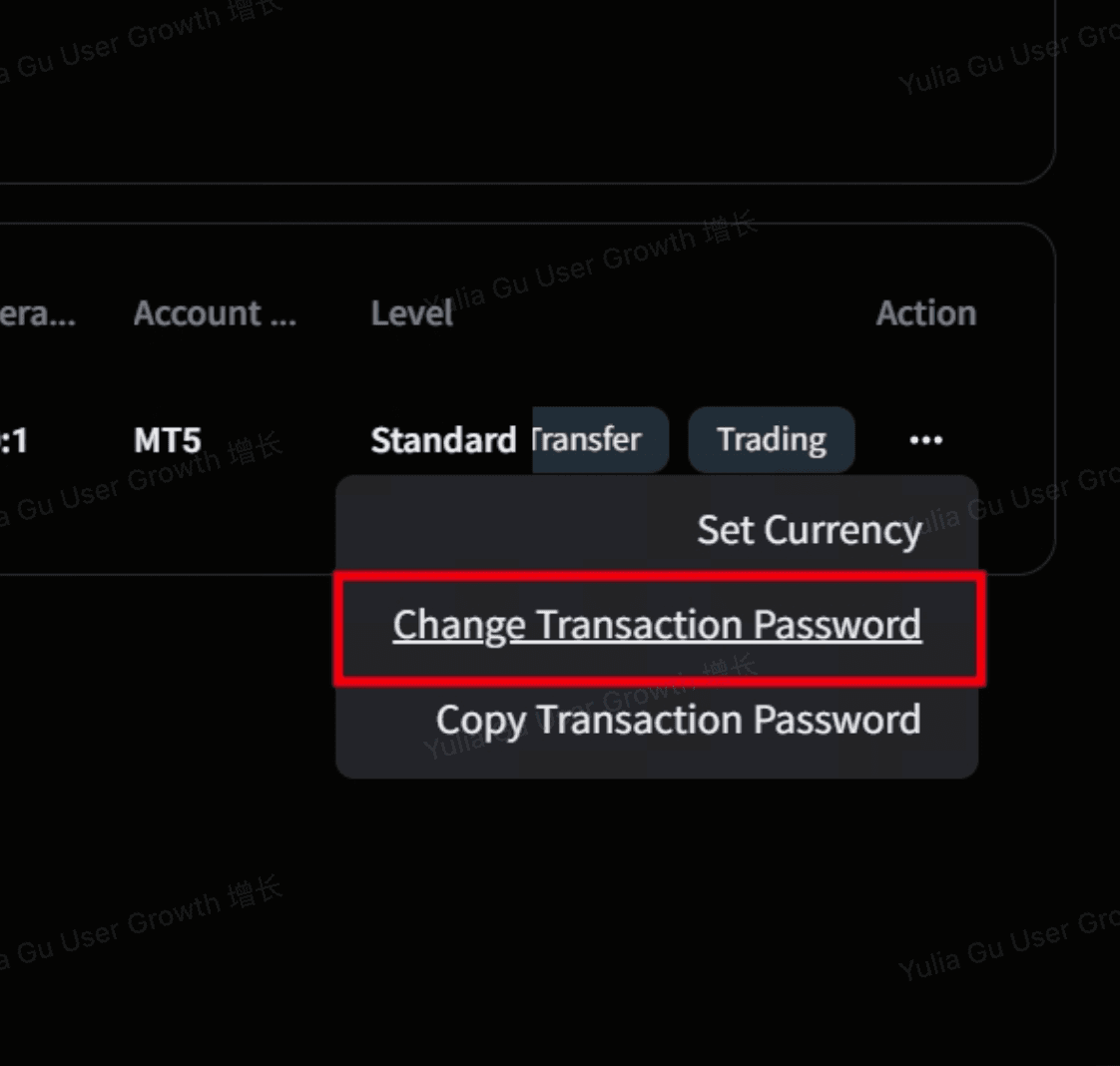
2.2 If you forget your password, log in to the Bifu web platform, go to [Account] → [Forex Account], find the [Change Trading Password] option on the right, and follow the prompts to reset a new password. The new password can be used to log in to MT5 immediately after it takes effect.
3. How to Change the Language in MT5?
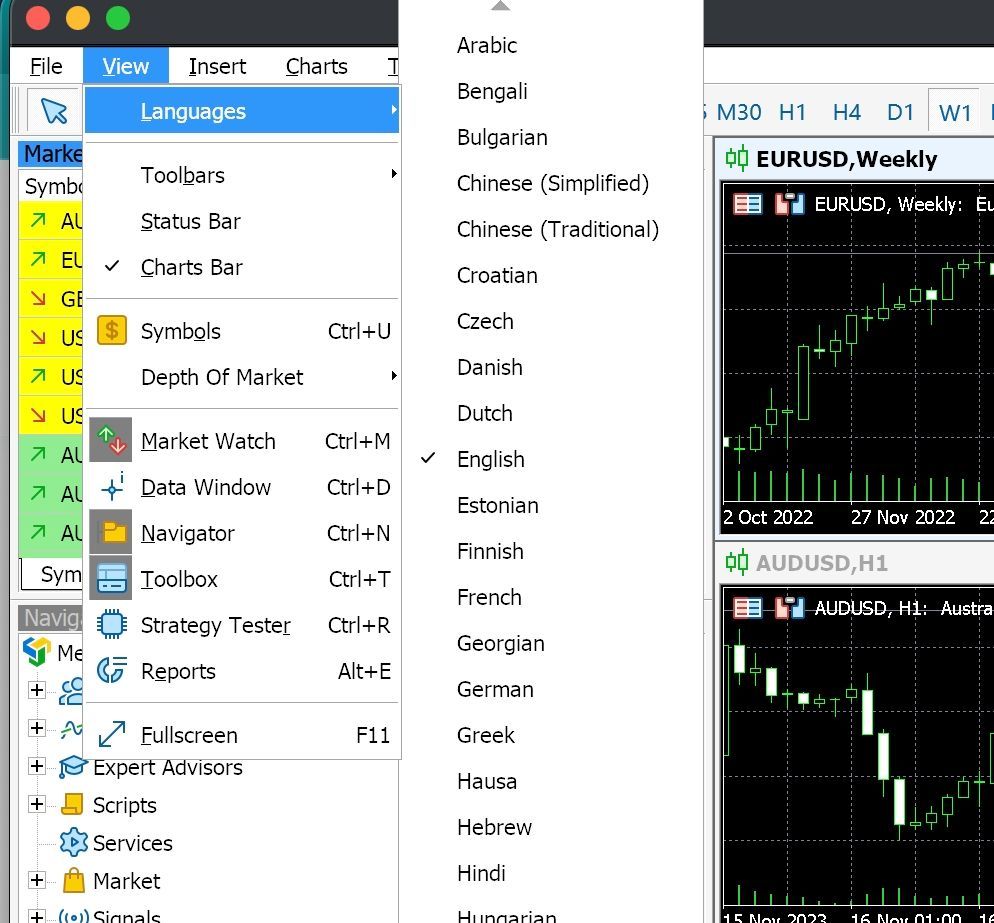
3.1 Open the MT5 client (the operation path is the same for desktop and mobile versions);
3.2 Click the top menu bar [View] and select the [Languages] option;
3.3 Select your preferred language from the language list (e.g., [Chinese (Simplified)]);
3.4 Restart the MT5 client for the language settings to take effect.
4. What Time Zone Is Used on MT5?
The time displayed on the MT5 platform is the server standard time, with the following time zone correspondences:
- Winter Time (November – March every year): GMT+2, 6 hours behind Beijing Time;
- Summer Time (March – November every year): GMT+3, 5 hours behind Beijing Time.
You can check the current server time in the status bar at the bottom of the MT5 client and arrange your trading operations reasonably according to the time difference.
5. How to View My MT5 Trading History?
- Open the MT5 client and click the [History] section in the left navigation bar / bottom menu bar;
- Enter the [Positions] category to view all historical opening and closing trading records;
- Click the [Clock/Calendar] icon in the upper right corner of the page to customize and filter the trading date range and trading instruments for accurate query of target records.
6. What Should I Do if the MT5 App on My Phone Is Unusable?
If the MT5 mobile app has problems such as freezing, crashing, or being unusable, try solving them by following the steps below:
- Check your network connection, try switching between Wi-Fi / mobile data to ensure a stable network;
- Fully close the MT5 app running in the background and reopen it to try the operation again;
- If the above operations are ineffective, uninstall the current MT5 app, re-download and install it from official and legitimate channels, then log in;
- If the problem still cannot be solved, you can temporarily conduct trading operations through the Bifu web platform or MT5 desktop client, and contact the platform customer service in a timely manner for assistance in troubleshooting.
7. How to Query Currency Spreads in the "Trade" Section of MT5?
MT5 adopts a floating spread mechanism, and spreads can be queried in real time in the [Trade] section with the following steps:
- Open the MT5 client and enter the [Trade] section;
- Find the target currency pair (e.g., EURUSD, GBPUSD) in the list of trading instruments;
- Check the corresponding [Ask Price] and [Bid Price] of the instrument. Spread = Ask Price − Bid Price, and you can get the current spread value of the currency pair;
- You can confirm the real-time spread in this way before placing an order to make a reasonable trading cost plan.
8.Download Link
Google Play
https://play.google.com/store/apps/detailsid=net.metaquotes.metatrader5&hl=zh&referrer
=ref_id%3d5188998548976136495%26utm_source%3dwww.metatrader5.com%26utm_
campaign%3dinstall.metaquotes
APK
Mac
https://apps.apple.com/sg/app/metatrader-5/id413251709?l=zh-Hans-CN
Desktop
https://www.metatrader5.com/zh/download
Frequently Asked Questions (FAQ)
Q1: What should I do if MT5 prompts that the server is unavailable during login?
A: Please first check if the server name is [Decode Global Limited] and verify the stability of your network connection. If the problem still cannot be solved, contact the platform customer service for assistance.
Q2: Why does the MT5 interface remain unchanged after changing the language?
A: The language settings will only take effect after restarting the MT5 client. If there is still no change after restarting, try reselecting the language and restarting again.
Q3: Why can't I query the recent records in my MT5 trading history?
A: Please check if the date filter range in the [History] section is correct. Adjust it to the target time period and you can view the records normally. All trading records can be queried from the first transaction to the current date.
Q4: Will my trading records be lost after reinstalling the MT5 mobile app?
A: No. Trading records are stored on the MT5 server, and you can synchronize and query all historical trading records by logging in to your account after reinstallation.
If you encounter any problems not mentioned above during the use of MT5, please contact the official Bifu customer service team in a timely manner, and we will provide you with professional operational assistance and troubleshooting support.


Trading
Risk Warning
Trading foreign exchange, contracts for difference, over-the-counter derivatives, margin products, and other leveraged financial instruments involves a high level of risk and may not be suitable for all clients. These products can result in losses that may exceed your initial deposit, depending on the product terms, account settings, and applicable legal protections. You should not trade unless you fully understand the nature of the products, the risks involved, and the extent of your exposure. When trading derivative products, you do not own or have any rights to the underlying asset.
The information provided on this website is general in nature and does not take into account your investment objectives, financial situation, trading experience, or particular needs. Nothing on this website should be construed as personal financial advice, investment advice, an offer, invitation, solicitation, recommendation, or inducement to buy, sell, subscribe for, or dispose of any financial product or service.
All market commentary, educational materials, research content, platform information, and other materials published on this website are provided for general information and reference purposes only. Past performance, historical data, examples, forecasts, or simulated results are not reliable indicators of future performance.
Access to Bifu Markets’ products and services is not available in all jurisdictions. We do not open accounts for residents of certain countries and jurisdictions, including but not limited to the United States, Australia, Canada, and the Democratic People's Republic of Korea.
By accessing this website, you confirm that you are doing so on your own initiative and that you are responsible for ensuring that your use of this website and any services provided by Bifu Markets complies with the laws and regulations applicable to you in your jurisdiction.
Bifu is operated by Bifu Markets (Pty) Ltd.
Registered address: Norwich Place West, 2nd Floor, Cnr 5th and Norwich, Sandown, Sandton, Gauteng, South Africa.