
How can we help?
How to Use the ORION Grid Strategy
14/08/2026 10:03:12
Introduction to ORION Wealth Academy
Features of the ORION Grid Strategy
How to View and Subscribe to Strategies on the BiFu Platform
You can browse strategy content in the App, but subscription must be completed on the Web platform.
Subscription (App):
Open the BiFu App, go to [Market] - [News] - [Trading Strategies], and click [Subscribe Now] to subscribe to a strategy.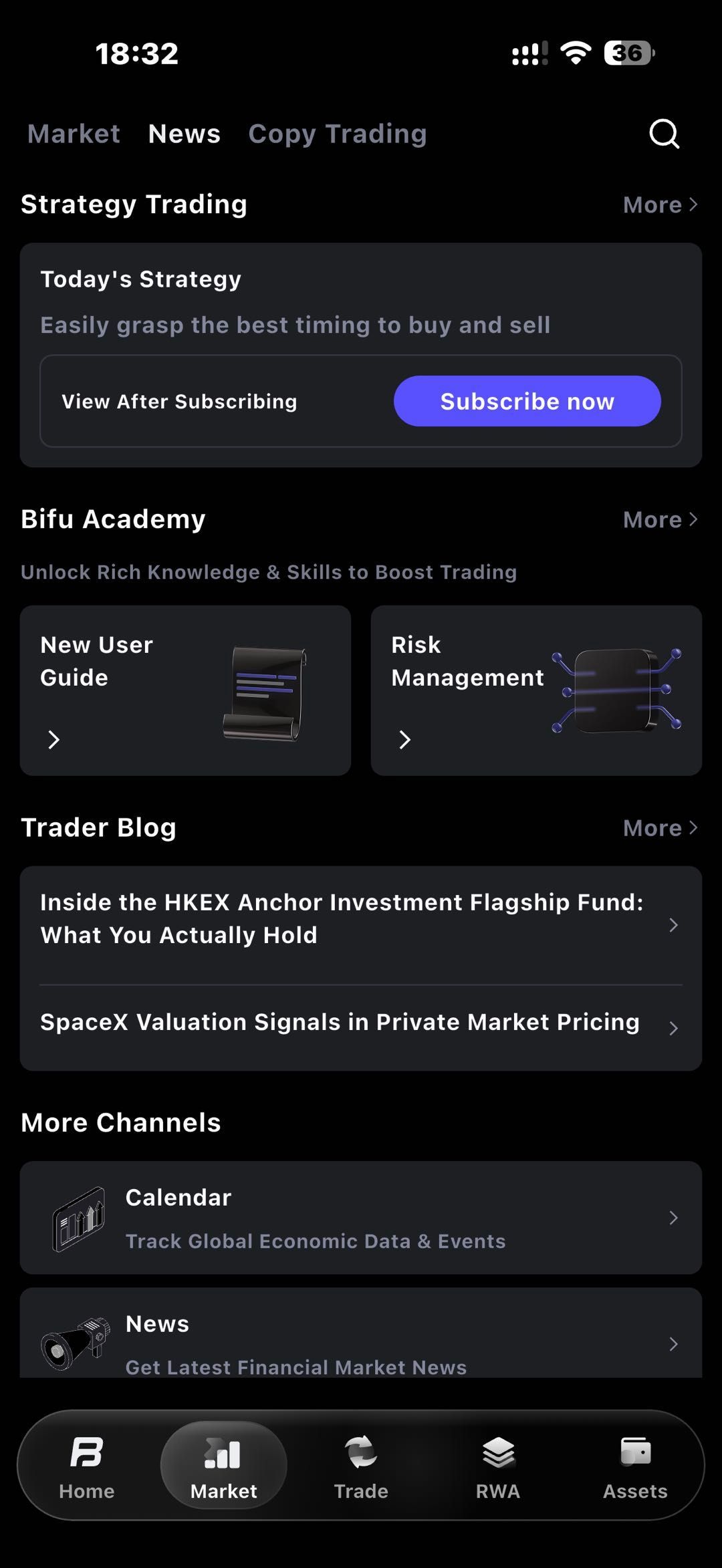
Subscription (Web):
Open the BiFu official website, go to [Square] - [Insights] - [Trading Strategies], and click [Subscribe Now] to subscribe to a strategy.
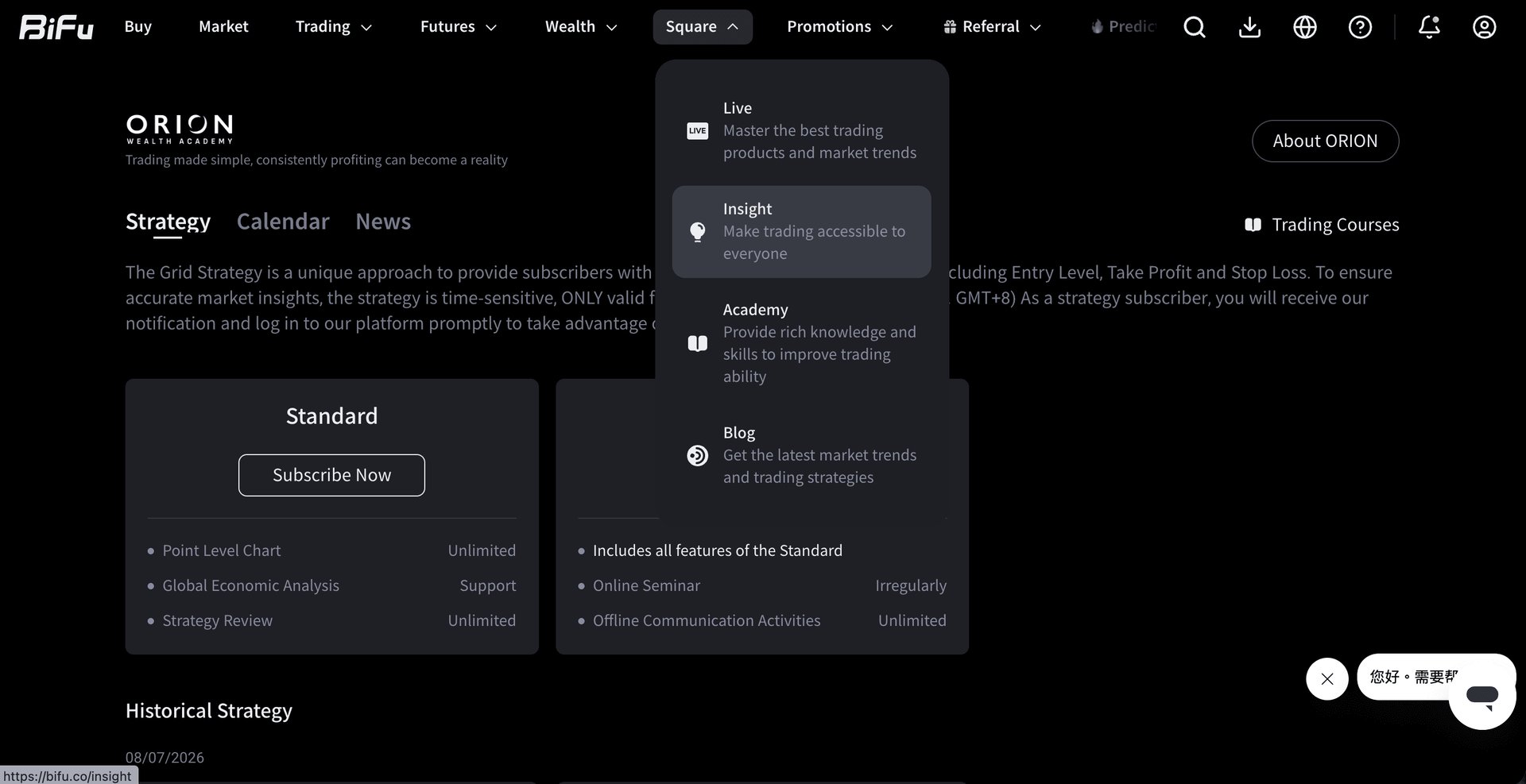
Strategy signals are only valid during specific time windows (UTC+8 Daylight Saving: 12:00–16:00; Standard Time: 13:00–17:00). Please check them within the valid period for timely execution.
When you click into the strategy details, the system will redirect you to the live candlestick chart, where all relevant signals will be displayed for precise reference.
BiFu users can subscribe to ORION strategy content in two ways:
Standard Subscription: Provides users with essential trading support content, including market observation, macroeconomic analysis, and strategy reviews, making it suitable for daily market tracking and learning.
Professional Subscription: Designed for users seeking deeper market analysis and live strategy follow-through. Paid subscribers can unlock all real-time signals, historical performance, expert commentary, and video courses.
Subscription and Renewal
Subscription plans are available in two versions: the Standard Plan (starting from US$19.90/week) and the Professional Plan (starting from US$699/month). Pricing may vary depending on the subscription duration.


Trading
Risk Warning
Trading foreign exchange, contracts for difference, over-the-counter derivatives, margin products, and other leveraged financial instruments involves a high level of risk and may not be suitable for all clients. These products can result in losses that may exceed your initial deposit, depending on the product terms, account settings, and applicable legal protections. You should not trade unless you fully understand the nature of the products, the risks involved, and the extent of your exposure. When trading derivative products, you do not own or have any rights to the underlying asset.
The information provided on this website is general in nature and does not take into account your investment objectives, financial situation, trading experience, or particular needs. Nothing on this website should be construed as personal financial advice, investment advice, an offer, invitation, solicitation, recommendation, or inducement to buy, sell, subscribe for, or dispose of any financial product or service.
All market commentary, educational materials, research content, platform information, and other materials published on this website are provided for general information and reference purposes only. Past performance, historical data, examples, forecasts, or simulated results are not reliable indicators of future performance.
Access to Bifu Markets’ products and services is not available in all jurisdictions. We do not open accounts for residents of certain countries and jurisdictions, including but not limited to the United States, Australia, Canada, and the Democratic People's Republic of Korea.
By accessing this website, you confirm that you are doing so on your own initiative and that you are responsible for ensuring that your use of this website and any services provided by Bifu Markets complies with the laws and regulations applicable to you in your jurisdiction.
Bifu is operated by Bifu Markets (Pty) Ltd.
Registered address: Norwich Place West, 2nd Floor, Cnr 5th and Norwich, Sandown, Sandton, Gauteng, South Africa.